
光标在哪里,语音就在哪里变成文字,无需插件。
01音频
02转写
我们明天十点在咖啡馆见……不,改成周五下午三点视频会议。
03润色
明天 10:00,咖啡馆
改为:周五 15:00,视频会议。
04最终文本
我们周五下午 3 点开视频会议吧。
专为 macOS 打造 · 德国制造开口说。
开口说。
Sophist 替你写。
面向现代办公的语音转文字助手:一个快捷键,适用于所有应用,输出润色后的文字。还支持会议、提词器与表达教练。
无需账户或订阅免费下载 Sophist,不限字数使用。
使用自己的 API 密钥连接你偏好的受支持服务商。
免费的本地模型轻松下载本地语音模型并免费使用。
完成
你需要的一切
✓
✓
✓
✓
✓
✓
✓
✓
✓
✓
✓任务
✓笔记
✓
✓
德国用 ❤️ 打造。
选择本地模型,语音数据留在 Mac。
基于你自己的文档回答。
专业人士为何选择 Sophist
适用于所有 macOS 应用
听写
按需选择云端或本地模型。
会议
实时转写、翻译、报告与会后教练。
任务与笔记
会后自动创建任务,也可随时口述任务和笔记。

Anna 如何全天使用 Sophist
从第一次听写到最后一项任务:六个章节,一个工作日。

用Compose 模式写邮件
Anna 说出意图,Sophist 完成邮件。Sophist 理解上下文,在任意应用中写好完整消息。

无语言障碍的会议
通话被实时转写和翻译。Sophist 在后台工作,让 Anna 专注交流。

保存重要幻灯片
一个快捷键捕捉所需画面。带时间戳的截图与转写中的正确位置关联。

会议纪要与任务
Sophist 生成纪要并识别下一步。摘要、决定、截图和任务在会后集中呈现。

今天还有什么?
Anna 用语音查看并推迟任务。任务列表显示未完成事项并接受口述日期调整。

惊喜预订完成
Anna 口述当天最后一封邮件。两分钟后邮件发出、任务完成,没有任何遗漏。
自然表达。
专业呈现。
Sophist 自动去除口头禅、修正语法并整理思路。
邮件Slack 消息商务邮件
邮件
你说
“嗯关于明天的会议可能要推迟因为客户还没发文件”
Sophist 写
关于明天的会议:我们应该推迟,因为客户尚未发送文件。
Slack 消息
你说
“我觉得问题在认证处理器令牌过期后没有正确刷新”
Sophist 写
问题似乎出在认证处理器:令牌过期后未能正确刷新。
商务邮件
你说
“王先生您好谢谢咨询许可我们下周可以聊一下”
Sophist 写
尊敬的王先生:感谢您咨询许可事宜。我们可以安排下周通话。
探索功能
01
听写模式
你的声音,你的规则。
按住快捷键即可说话,文字会出现在任意应用的光标位置。
两种听写方式
使用按住说话,或为长文本开启免提模式。
领先的语音模型
可选云端服务或完全私密的离线模型。
AI 后处理
为每个应用设置不同风格,Sophist 会自动应用。
ToMaya Thompson
Follow-up and next steps for our project
Hi Maya,
Thank you for the productive conversation today. I have summarized the key decisions and will send the revised timeline by tomorrow afternoon.
The implementation team can begin with the first phase next Monday
LIVE DICTATION
The implementation team can begin with the first phase next Monday, while we prepare the remaining materials and confirm the final milestones.
AI
02
Compose 模式
停止打字,直接下达指令。
告诉 Sophist 你的目标,它会把口述要求写成完整文本。
用语音写邮件
说出要点,获得可直接审阅的专业邮件。
文档作为上下文
复制文档后,Sophist 会融入相关信息。
适合销售与客服
将多个来源整合为连贯答复。
ToMaya Thompson
Project kickoff and next steps
Hi Maya,
Thank you for the productive conversation today. We are ready to begin the first phase next Monday. I will send the revised timeline and remaining materials by tomorrow afternoon.
Best regards,
LIVE DICTATION
Write a concise, professional follow-up email to Maya confirming that the implementation team can begin next Monday and that I will send the revised timeline tomorrow.
AI
03
智能代理模式
你的知识,随叫随到。
连接自己的知识库,把所需信息直接写入文本。
几分钟即可设置
添加手册、法规和规格;数据保留在 Mac。
用“Hey Anna”唤醒
说出唤醒词即可立即查询文档。
精确回答
询问具体条款、参数或流程。
ToMaya Thompson
Enterprise plan: security and support
Hi Maya,
Thank you for your interest in our Enterprise plan. According to our product knowledge base, it includes single sign-on, priority support with a two-hour response target, and an optional on-premise deployment for maximum data control.
I would be happy to arrange a technical consultation.
LIVE DICTATION
Hey Anna, write Maya a professional email explaining the security and support features included in our Enterprise plan, using our product knowledge base.
AI
04
会议记录
每句话,每种语言。
录制线上或线下会议,获取实时转写、摘要、待办和翻译。
记录任何会议
同时采集系统声音和麦克风。
实时翻译
以所需语言跟进对话。
摘要与待办
自动提取决定、行动项和未决问题。
Meeting in progress
00:22✦ After the meeting, the transcript is refined and speakers are identified.
Original
Speaker 1:The launch plan is nearly complete. Let's review the final milestones before Friday.
Speaker 2:I'll confirm the timeline with the design team this afternoon.
German
Sprecher 1:Der Einführungsplan ist fast fertig. Lassen Sie uns die letzten Meilensteine vor Freitag prüfen.
Sprecher 2:Ich bestätige den Zeitplan heute Nachmittag mit dem Designteam.
05
智能提词器
会聆听,也会跟随。
粘贴讲稿即可演讲,文字会按照你的语速滚动。
语音同步滚动
你停它也停,你加速它便跟上。
自由发挥
跳过或新增句子后,它会重新找到位置。
悬浮且隐蔽
轻量浮层,不会出现在屏幕共享中。
Welcome to our product update.
Today we are introducing a faster way to turn ideas into finished work.
The new workflow makes every handoff feel effortless.
Notes, meetings, and follow-up tasks now stay together in one clear place.
Let's begin with the changes your team can use immediately.
06
会议提示助手
悄悄提示答案。
倾听会议,并从你的文档中私密显示相关答案。
实时聆听
识别客户和同事提出的问题。
有来源的答案
显示价格、参数和条款及其来源。
只有你能看到
不会向其他参会者分享任何内容。
SouffleurListening
Guide 0/7
- Confirm objectives and decision criteria
- Review the current workflow
- Identify the biggest bottlenecks
- Define security requirements
- Discuss the rollout timeline
- Clarify success metrics
- Agree on next steps
The customer asks whether sensitive recordings can remain on-device.
- Local transcription keeps audio and text on the Mac
- Cloud processing can be disabled for selected workflows
The team wants to know how quickly a pilot can be introduced.
- Pilot setup: one afternoon for a small team
- Rollout: templates and shortcuts can be shared centrally
07
会议教练
每次通话都在进步。
分析发言占比、语速、口头禅和未回答问题,并给出具体建议。
发言时间与语速
查看你说了多久、速度如何。
表达清晰度
发现重复内容和未回答问题。
可执行反馈
获得下次会议可采用的三个明确行动。
Project Review · September 5, 20263 speakers · 38 min
TranscriptMy NotesSummaryScreenshotsAction ItemsCoach
Overall impression
You guided the conversation with a calm pace and gave the team room to explain their concerns. Your questions created clarity, while the closing could have defined ownership more precisely.
Strengths
- Clear opening: You established the purpose and expected outcome in under a minute.
- Thoughtful follow-ups: You reflected key points before moving to the next topic.
Opportunities
- Shorten long explanations: Pause after the core message and invite a response.
- Confirm next steps: Assign an owner and deadline to every decision.
08
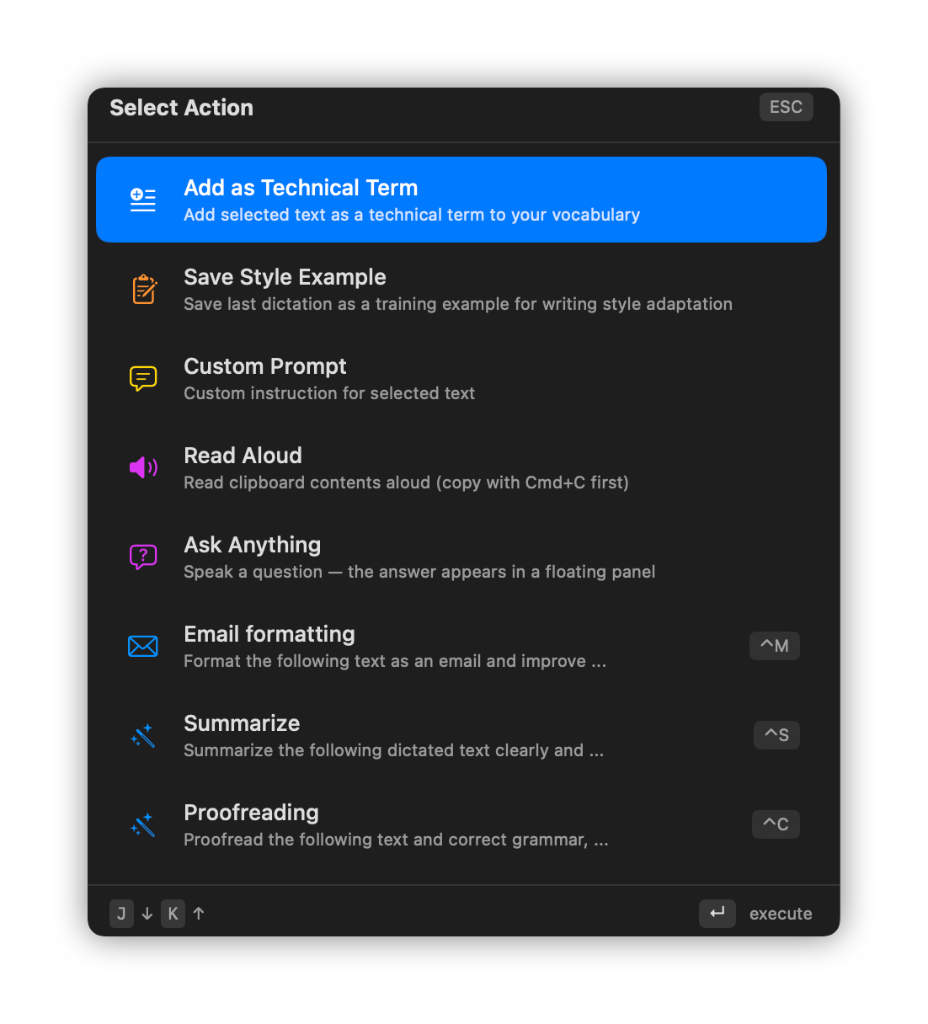
文本操作
不只是听写。
在任意应用中选中文本,用快捷键翻译、校对、改写或重新排版。
内置操作
翻译、总结、校对、排版或朗读。
自定义提示词
创建符合公司语气的专属操作。
操作快捷键
立即用优化结果替换所选文本。
09
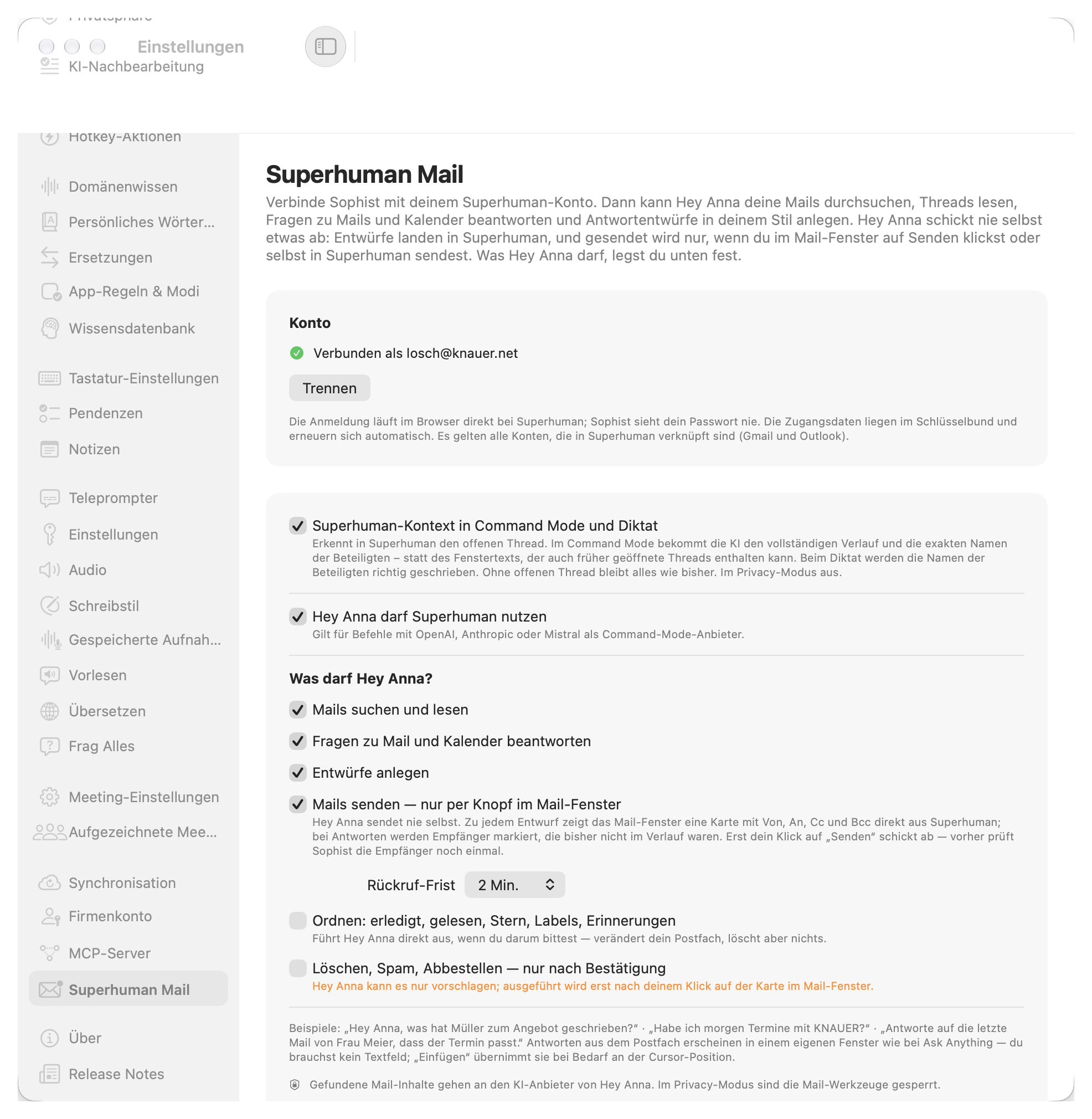
Superhuman Mail
New in 1.67. Hey Anna works right inside your inbox.
Connect Sophist to your Superhuman account. Hey Anna searches your email, reads threads, answers questions about mail and calendar and drafts replies in your style. She never sends on her own.
Search, read, ask
"Hey Anna, what did Miller write about the offer?" Works with all Gmail and Outlook accounts linked in Superhuman.
Drafts with full control
Every draft shows From, To, Cc and Bcc. New recipients are highlighted, and only your click sends, with an undo window you choose.
Context in Compose Mode & dictation
Sophist recognizes the open thread, gives the AI the full conversation and spells every participant's name correctly.
10
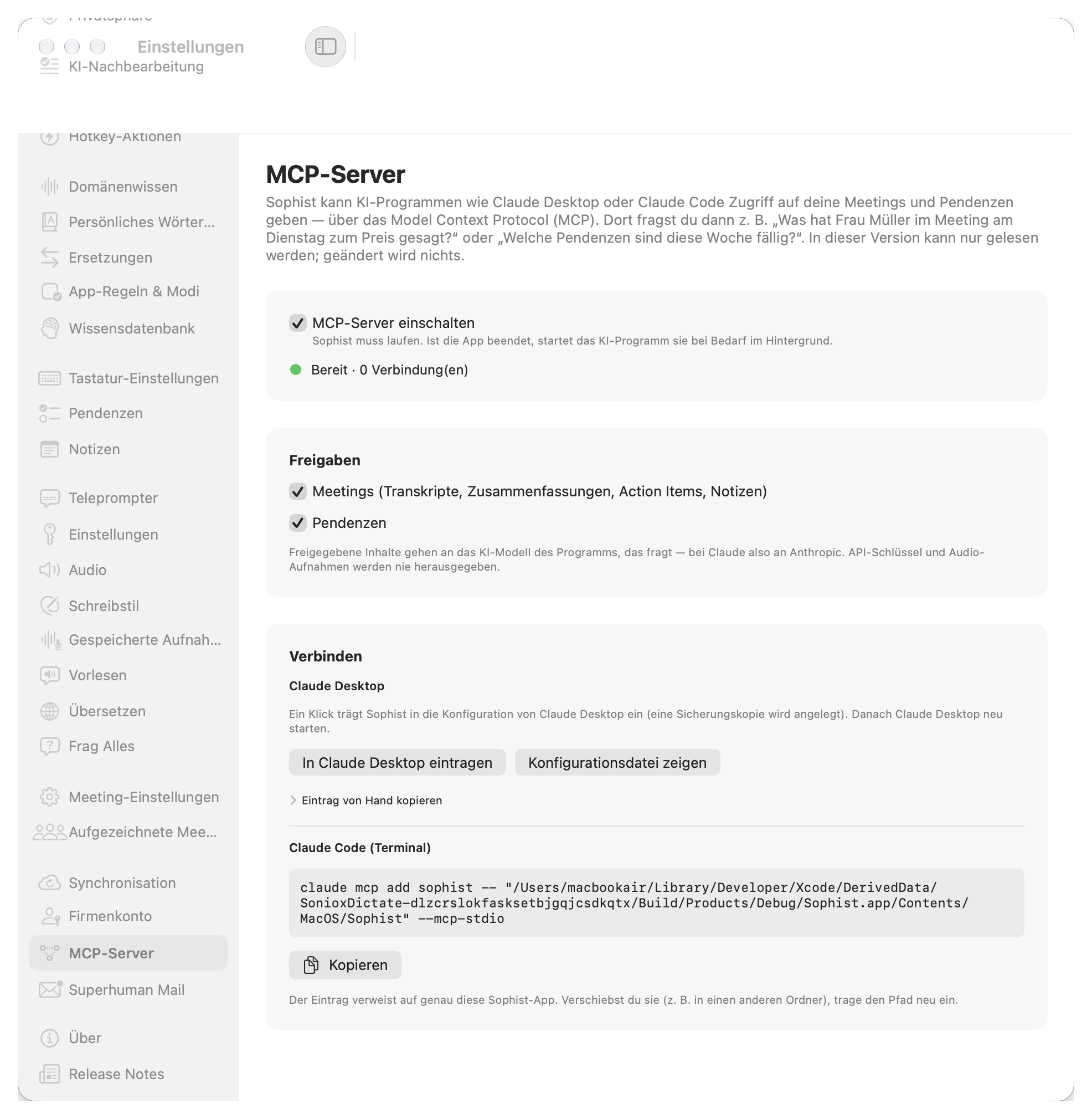
MCP Server for Claude
New in 1.67. Your meetings and tasks, available in Claude.
Sophist shares your meetings and tasks with Claude Desktop and Claude Code. Ask: "What did Ms Miller say about the price in Tuesday's meeting?" or "Which tasks are due this week?"
You choose what to share
Meetings (transcripts, summaries, action items, notes) and tasks.
Set up in one click
One click adds Sophist to Claude Desktop. For Claude Code there's a ready-to-copy command.
Read-only and private
API keys and audio recordings are never shared, and in Privacy Mode nothing is shared.
兼容性
所有应用,一个快捷键。
光标在哪里,语音就在哪里变成文字。
 Gmail
Gmail Notion
 WhatsApp
 Telegram
 Signal
 Discord
 iMessage
 Google Docs
 Google Sheets
 Google Meet
 Figma
Figma Linear
 Claude
 Obsidian
 Safari
 Chrome
 Firefox
 Trello
 Zoom
Zoom Asana
Asana Jira
Jira Spotify
 Raycast
 Apple
Apple Threads
 X (Twitter)
 GitHub
 Reddit
……以及所有带文本框的 macOS 应用。
所有产品名称、徽标和品牌均归其各自所有者所有,仅用于说明应用兼容性。
应用内部
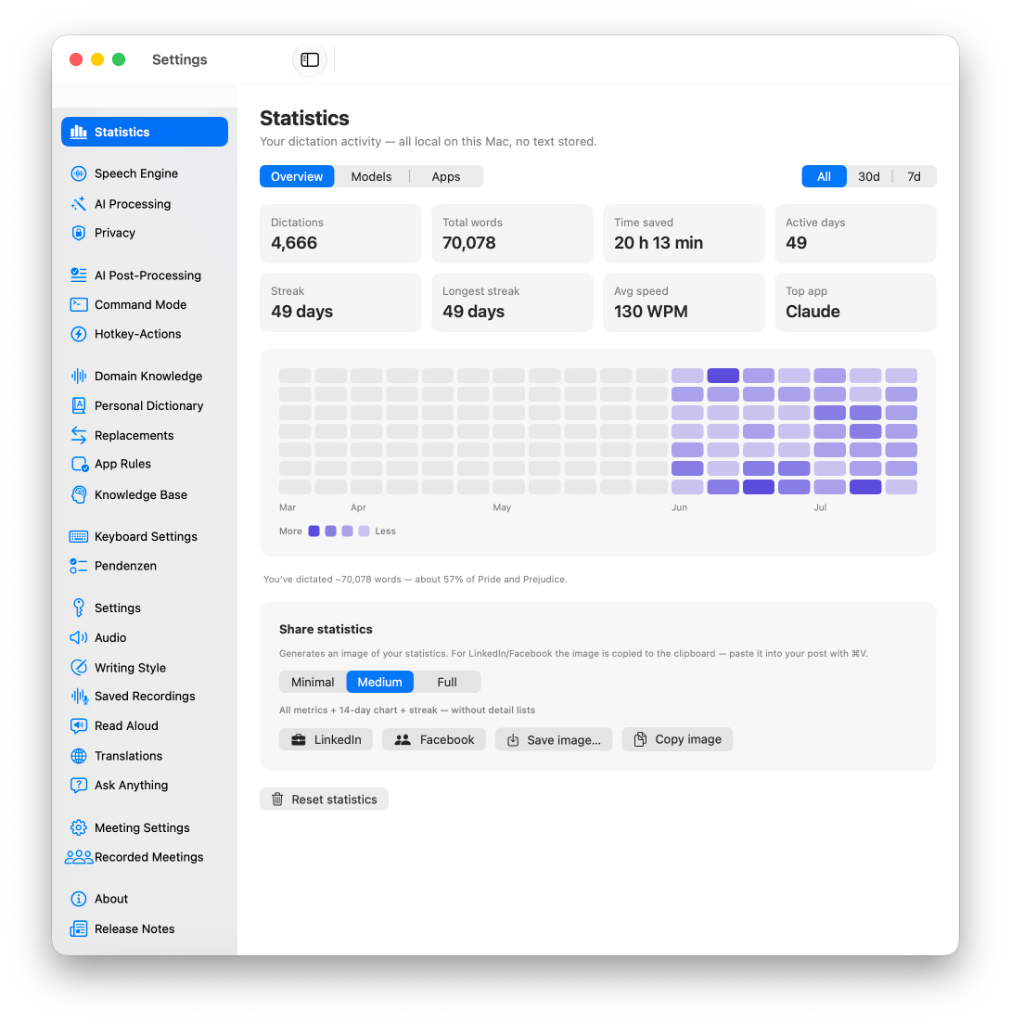
每项设置,尽在掌控。
直接在 Mac 上通过清晰、私密的设置控制这项 Sophist 功能。
直接在 Mac 上通过清晰、私密的设置控制这项 Sophist 功能。
直接在 Mac 上通过清晰、私密的设置控制这项 Sophist 功能。
直接在 Mac 上通过清晰、私密的设置控制这项 Sophist 功能。
直接在 Mac 上通过清晰、私密的设置控制这项 Sophist 功能。
直接在 Mac 上通过清晰、私密的设置控制这项 Sophist 功能。
直接在 Mac 上通过清晰、私密的设置控制这项 Sophist 功能。
直接在 Mac 上通过清晰、私密的设置控制这项 Sophist 功能。
直接在 Mac 上通过清晰、私密的设置控制这项 Sophist 功能。
直接在 Mac 上通过清晰、私密的设置控制这项 Sophist 功能。
直接在 Mac 上通过清晰、私密的设置控制这项 Sophist 功能。
直接在 Mac 上通过清晰、私密的设置控制这项 Sophist 功能。
直接在 Mac 上通过清晰、私密的设置控制这项 Sophist 功能。
直接在 Mac 上通过清晰、私密的设置控制这项 Sophist 功能。
直接在 Mac 上通过清晰、私密的设置控制这项 Sophist 功能。
直接在 Mac 上通过清晰、私密的设置控制这项 Sophist 功能。
直接在 Mac 上通过清晰、私密的设置控制这项 Sophist 功能。
直接在 Mac 上通过清晰、私密的设置控制这项 Sophist 功能。
直接在 Mac 上通过清晰、私密的设置控制这项 Sophist 功能。
直接在 Mac 上通过清晰、私密的设置控制这项 Sophist 功能。
直接在 Mac 上通过清晰、私密的设置控制这项 Sophist 功能。
直接在 Mac 上通过清晰、私密的设置控制这项 Sophist 功能。
直接在 Mac 上通过清晰、私密的设置控制这项 Sophist 功能。
直接在 Mac 上通过清晰、私密的设置控制这项 Sophist 功能。
直接在 Mac 上通过清晰、私密的设置控制这项 Sophist 功能。
直接在 Mac 上通过清晰、私密的设置控制这项 Sophist 功能。
直接在 Mac 上通过清晰、私密的设置控制这项 Sophist 功能。
直接在 Mac 上通过清晰、私密的设置控制这项 Sophist 功能。
实际案例
视频与教程
专业人士为何选择 Sophist
面向 Mac 专业人士的 AI 语音转文字应用:听写、命令与知识管理。
领先的 AI 听写
速度提升三倍
隐私优先的离线听写
AI 语音命令
内置知识库
适用于所有应用
Sophist 是一款面向 Mac 的 AI 听写工具,支持离线隐私、语音命令和内置知识库。
写得更快
速度最高可达打字的三倍。
结构更清晰
自动生成段落、列表和标题。
更专注
减少上下文切换,保持工作流。